

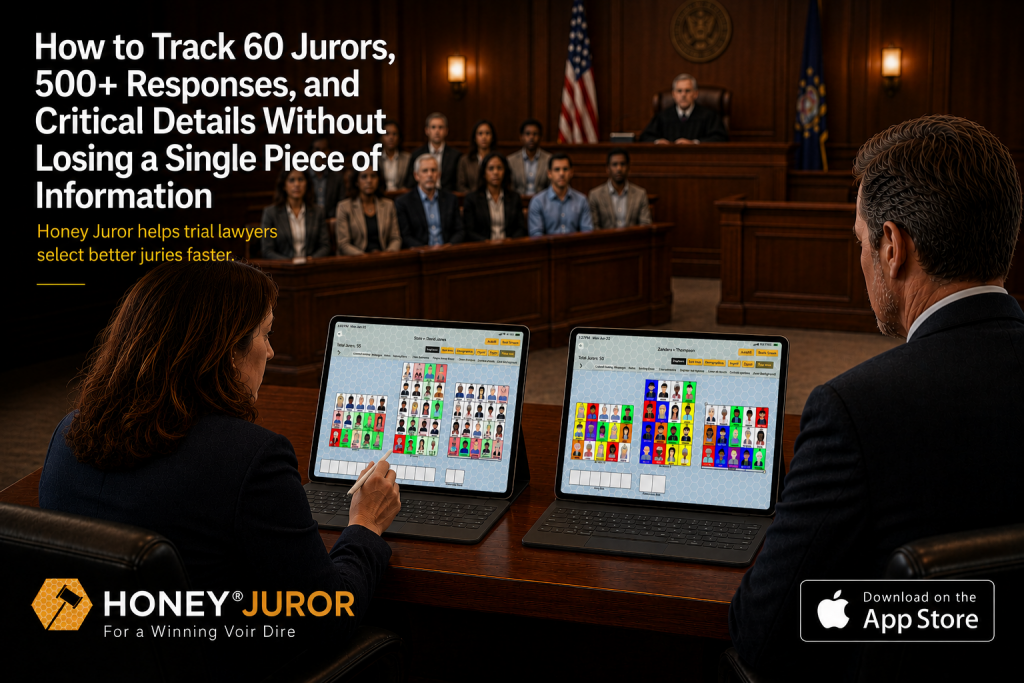
The collaborative note-taking system that keeps trial teams organized during the most information-intensive part of trial.
By Matt Powell, Board Certified Civil Trial Lawyer
Honey.Law – Created by Lawyers for Lawyers
The 9:47 AM Problem
It’s 9:47 AM on the first day of voir dire. You’re questioning Juror #23 about their prior experience with insurance companies when you notice your co-counsel frantically scribbling notes. Your paralegal is typing on a laptop. Your associate is flipping through a legal pad.
Three different versions of the same conversation. Three different sets of observations. And you have 37 more jurors to question before lunch.
By the time you’re making strike decisions at 3 PM, you can’t remember which juror said what. Your team has conflicting information. And you just realized you missed that Juror #7 works for your opponent’s biggest client—a detail buried in someone’s notes that nobody saw.
This isn’t a strategy problem. This is an information organization problem.
Why Traditional Methods Fail
The Paper Notebook Trap
Legal pads feel safe. They’re familiar. But they’re designed for one person writing alone—not for trial teams capturing real-time information.
What goes wrong:
- Your co-counsel cannot see your notes while you are questioning
- Your paralegal captures different details than you do
- By hour three, your handwriting is illegible
- You spill coffee on page 7. Those notes are gone forever
- During strike decisions, you are all working from different information
The Spreadsheet Band-Aid
Excel seems organized until you’re trying to update cell B47 while listening to a juror’s answer and watching their body language simultaneously.
What goes wrong:
- Not designed for mobile use in court
- Multiple users = version conflicts
- No visual components (no seating chart, no symbols)
- Clunky to search during fast-paced voir dire
- Takes 4 clicks to record a single observation
The Whiteboard Illusion
Sticky notes and markers feel visual and collaborative—until the bailiff says ‘court’s in session’ and you have to erase everything.
What goes wrong:
- Temporary by design
- Cannot save or reference later
- Requires everyone to be physically present
- Information gets reorganized accidentally
- Zero portability between courtrooms
The Real Cost
When information isn’t organized, you don’t just lose data—you lose the ability to make informed decisions. You strike jurors based on incomplete information. You miss patterns that could change your case. Your team spends more time reconciling notes than strategizing.
The Solution: Real-Time Collaborative Information Organization
Honey Juror works by creating a single, shared source of truth that your entire team can access simultaneously.
1. Digital Seating Chart
Every juror has a visual position that matches your courtroom. Click any seat to see that juror’s complete profile—demographics, responses, your team’s notes, ratings, and challenge history. No more ‘which one was Juror #14 again?’
2. Real-Time Team Collaboration
Co-counsel, paralegals, and associates all take notes simultaneously. Everyone sees updates instantly. When your paralegal flags that Juror #7 works for the opposing firm, you see it immediately—not three hours later.
3. Visual Organization System
Customizable symbols let you mark jurors instantly: favorable, unfavorable, needs follow-up, cause challenge candidate. Color-coded avatars make identification instant. Custom rating scales quantify subjective impressions.
4. Structured Data Capture
Hand-raise tracking records who responds to which questions. Challenge tracking monitors both sides’ peremptory and cause challenges. Everything is searchable and exportable.
5. Mobile-First Design
Built for iPad use in the courtroom. Works offline when Wi-Fi is unreliable. Syncs instantly when connection returns. Your data is secure, backed up, and accessible anywhere.
The Result:
When it’s time to make strike decisions, you have complete, organized information from your entire team—not scattered notes and conflicting memories.
What You Get (Immediate Post-Download)
- 1. Collaborative Workspace – Invite your entire trial team (up to 10 users via Apple Family Plan)
- 2. Digital Seating Chart – Mirror your courtroom layout instantly
- 3. Custom Symbol Library – Create your own visual shorthand
- 4. Rating Scale Builder – Design evaluation criteria for your case type
- 5. Challenge Tracker – Monitor peremptory and cause challenges in real-time
- 6. Hand-Raise Recorder – Track who responds to every question
- 7. Demographics Dashboard – Panel and seated juror data at a glance
- 8. Secure Cloud Sync – Your data is backed up and accessible on any device
Plus:
- 80+ tutorial videos
- Template library for different case types
- Export capabilities for trial notebooks
- Integration with Honey CMS (coming soon)
Proof: Built By a Trial Lawyer Who Needed This
I’m Matt Powell, Board Certified Civil Trial Lawyer. I built Honey Juror after experiencing this exact problem—scrambling to organize information during jury selection, missing critical details, watching my team work from different notes.
Used By:
- Civil litigators (plaintiff & defense)
- Criminal defense attorneys
- Prosecutors
- Government attorneys
- Solo practitioners and AmLaw 100 firms
Works For:
- Personal injury trials
- Criminal cases
- Commercial litigation
- Family law
- Any case with jury selection
The Logic:
Information is valuable only if it is clear and organized. Honey Juror doesn’t tell you which jurors to pick—it ensures you have organized information so you can make that decision yourself.
Objection Handling
“I am not tech-savvy”
Honey Juror is designed for lawyers, not tech experts. If you can use an iPad, you can use Honey Juror. Plus, we have 180+ tutorial videos walking you through every feature.
“I do not have time to learn new software”
You can be up and running in 10 minutes. The interface is intuitive because it mirrors how you already think about jury selection—just organized digitally instead of on paper.
“My team is resistant to change”
Start with one case. Let them see how much easier collaboration becomes when everyone is working from the same information. Most teams never want to go back to paper after trying it once.
“What if it does not work for my case type?”
Honey Juror is case-type agnostic. Whether you are handling a personal injury trial, criminal defense, or complex commercial litigation, the organization principles are the same. Customizable scales and symbols let you adapt it to any practice area.
“Is my data secure?”
Yes. Enterprise-grade encryption. Secure cloud backup. Your case information is protected with the same standards used by major law firms.
Risk Reversal
Try Honey Juror Free
Download from the Apple App Store and start your free trial today. Experience real-time collaboration on your next case. If it does not transform how your team organizes jury selection information, cancel anytime.
No long-term contracts. No setup fees. Just $30/month for up to 10 users.
Ready to Get Organized?
Download Honey Juror on the App Store
$30/month • Up to 10 users ($3/user) • Free trial • Cancel anytime
Information is valuable only if it is clear and organized.
FAQ
What is the biggest mistake lawyers make when tracking jury selection information?
Relying on a single person is notes. Jury selection happens too fast for one person to capture everything. The most effective approach involves multiple team members collaborating in real-time.
Can I use Honey Juror for both civil and criminal cases?
Yes. Honey Juror is designed for any trial lawyer—civil or criminal, plaintiff or defense, government or private practice. The organization principles are the same regardless of case type.
How many team members can collaborate using Honey Juror?
Honey Juror supports real-time collaboration for your entire team. Under the Apple Family Plan, $30/month gives you access for up to 10 users—making it just $3 per user per month.
Does Honey Juror tell me which jurors to pick?
No. Honey Juror is an information organization tool, not a jury selection advisor. We do not tell you which jurors to choose, what questions to ask, or when to use challenges. We ensure you have clear, organized information so you can make those decisions yourself.
Can I try Honey Juror before subscribing?
Yes. You can download Honey Juror from the Apple App Store and start a free trial. Experience how organized information changes your jury selection process.
About the Author
Matt Powell is a Board Certified Civil Trial Lawyer. He created Honey Juror after experiencing firsthand the challenges of staying organized during jury selection. Honey.Law builds tools that help lawyers organize information so they can focus on what they do best—practicing law.
—
Disclaimer: This article discusses information organization tools and methods. It does not constitute legal advice. Every case is different, and you should consult with qualified counsel regarding your specific situation.
